
Building Your Airport4 min read
Ground cover
Ground cover is a free natural-surface polygon laid under your whole airport. It replaces the aerial photo beneath your runways and aprons - which is often ugly, mismatched, or shows the farm that used to be there - with clean, consistent ground. It never draws from your materials.
What it is
Press Gto open the Ground tool. The satellite imagery under a new airport rarely matches what you're building: seams between photo passes, old field boundaries, roads that no longer make sense. Ground cover paints over all of it with one natural surface, so runways and aprons sit on ground that belongs to them. Because it's a free layer, use it on every airport - there is no reason not to.
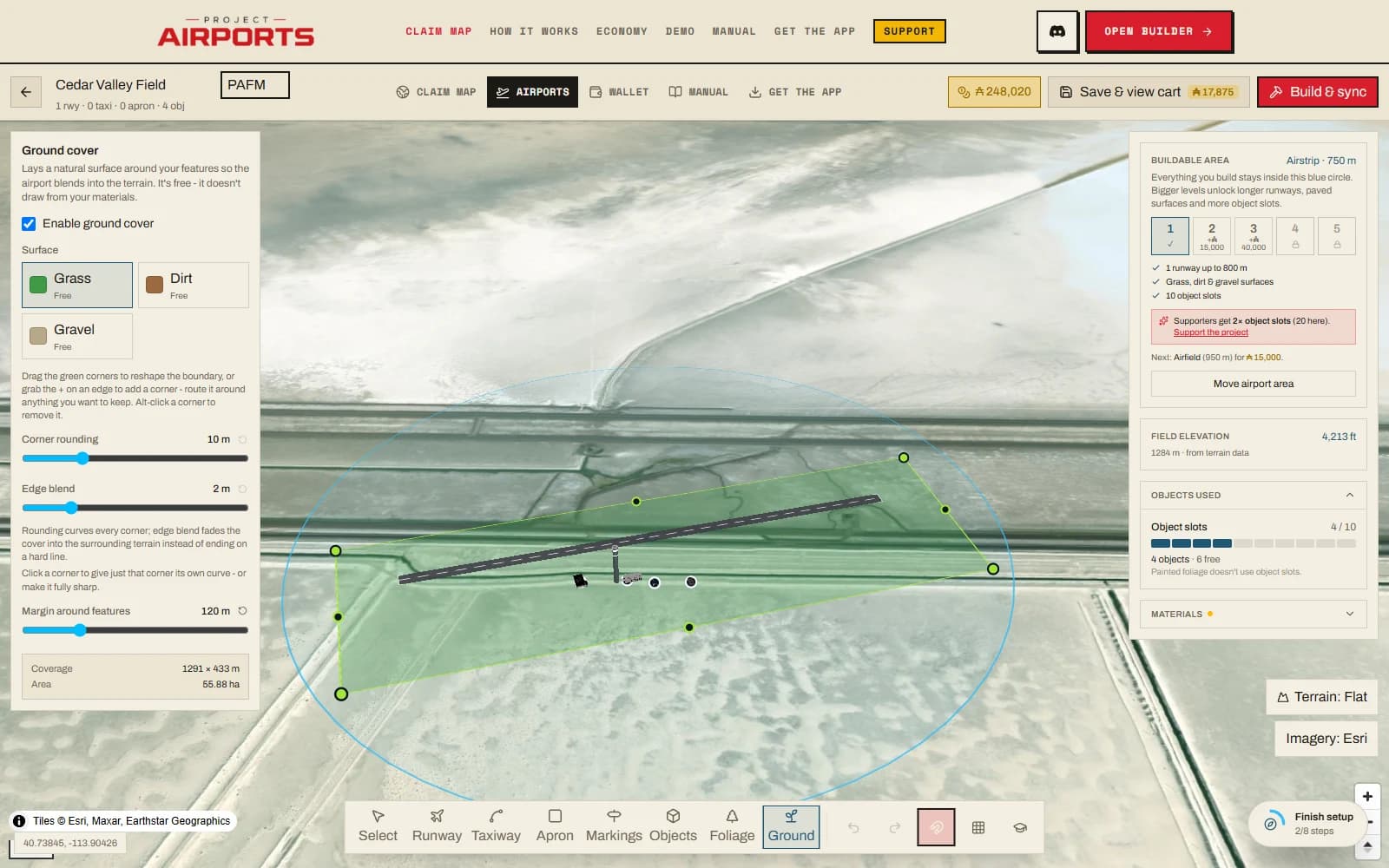
Controls
- Enable ground cover - the master checkbox.
- Surface swatch - pick from the free natural surfaces: grass, dirt, or gravel.
- Corner rounding- slider from 0 (sharp) up to the maximum; softens the outline's corners.
- Edge blend - a feather slider that fades the cover into the surrounding terrain. 0 gives a hard edge.
- Terrain fit (in the Terrain tool, not this tray) - choose Level pad, Follow ground, orSmooth bumps. Level pad is the default for new airports. The advanced fine-tuning section exposes the exact leveling percentage when a preset is not enough. The shaped surface runs to the boundary you draw, blends into the world beyond it, and never reshapes ground past it.
- Margin around features- in auto mode, how much breathing room the boundary keeps around everything you've built.
Shaping the boundary
By default the boundary is automatic: a rectangle sized around everything you've built, plus the margin. As your airport grows, it grows.
Going custom
Drag any green corner and the boundary switches to a custom outline you fully control. Grab the + handle on an edge to add a corner - useful for routing the cover around something you want to keep, like a real pond. Alt-click removes a corner. Clicking a corner opens a per-corner rounding override: This corner sets its own radius, Follow boundary slider returns it to the global setting.
Changed your mind? Reset to auto throws away the custom outline and returns to the automatic rectangle.
Extra ground areas
The main cover is one connected field - but airports aren't always. Draw a new ground area (at the bottom of the Ground tool) lets you click out a completely separate patch of cleared ground anywhere in your buildable area: across a road, on the far side of a stream, or a detached corner of the claim you want to develop without stringing aprons between.
- Independent settings - select an area to give it its own surface (grass, dirt or gravel), corner rounding and edge blend, including per-corner overrides. Use Edit this area in Terrainfor leveling and height, or choose the area in the Terrain tool'sExtra ground area terrain menu. Its Leveling is a three-way choice: Airport follows the main Ground leveling slider (the default), Customlevels by the area's own percentage, and Natural excludes the ground entirely - it keeps its untouched shape even where the main field would level it, so a natural area drawn inside your boundary punches a hole through the leveling (a ring-shaped field with a wild centre, say). It reshapes exactly like the main boundary: drag corners, + to add, Alt-click to remove, grab the surface to move the whole area.
- Levels to its own ground- a detached area on a hillside flattens to the terrain it sits on, not the main field's elevation, so it never digs a crater or floats.
- Full ground prep - photogrammetry cleanup, tree/building/rock exclusion and runway cut-outs all apply inside each area, same as the main field.
- Billed by size - unlike the free main cover, extra areas draw from your ground-material inventory per m². It is the cheapest material in the game, and unused area refunds like any other material.
What happens automatically
Separate from the cover polygon, every airport gets automatic ground cleanup and a level terrain starting point:
- Terrain fit - new airports start on Level padat the surveyed reference height. Choose Follow groundto retain the site's slopes or Smooth bumpsfor partial leveling. Existing airports keep their saved setting. Check the 3D preview's cut and fill before you save and build, especially on steep sites.
- Clutter exclusionacross the whole buildable circle: auto-generated buildings, vegetation, roads and their traffic, street lights, powerlines, and parked cars are all removed, so your field sits on clean ground instead of streaming-photogrammetry debris. The world's own trees grow right up to your boundary; tick Clear trees beyond the boundaryin either ground panel if you'd rather the sim shave a wide band of them outside it too - say, to keep final approach clear. This setting is shared by the main cover and every extra ground area; changing it in either panel changes it for all of them.
Making it look hand-laid
A sharp-cornered rectangle with a hard edge reads as stamped onto the world. Some corner rounding plus a generous edge blend makes the same field look hand-laid - the cover fades into the surrounding terrain instead of ending at a fence line that isn't there. It's the cheapest realism upgrade in the builder, because it costs nothing at all.